
For dental, med spa & chiropractic practices
New Patients Check Google Reviews Before They Book. What Do Yours Say?
Add patients after each visit. AutoReview sends a review request with a direct link to your Google page — no awkward front desk ask. Follow-ups happen automatically. From $59/mo with a 7-day free trial. Cancel anytime.
- Set up in 15 minutes
- Replies never mention a patient's care
- 7-day free trial, cancel anytime
Lved by dental, med spa & chiropractic practices
How AutoReview Works
Set it up once. From then on it asks, follows up, and replies without anyone at the front desk lifting a finger.
Connect your patients (5 minutes)
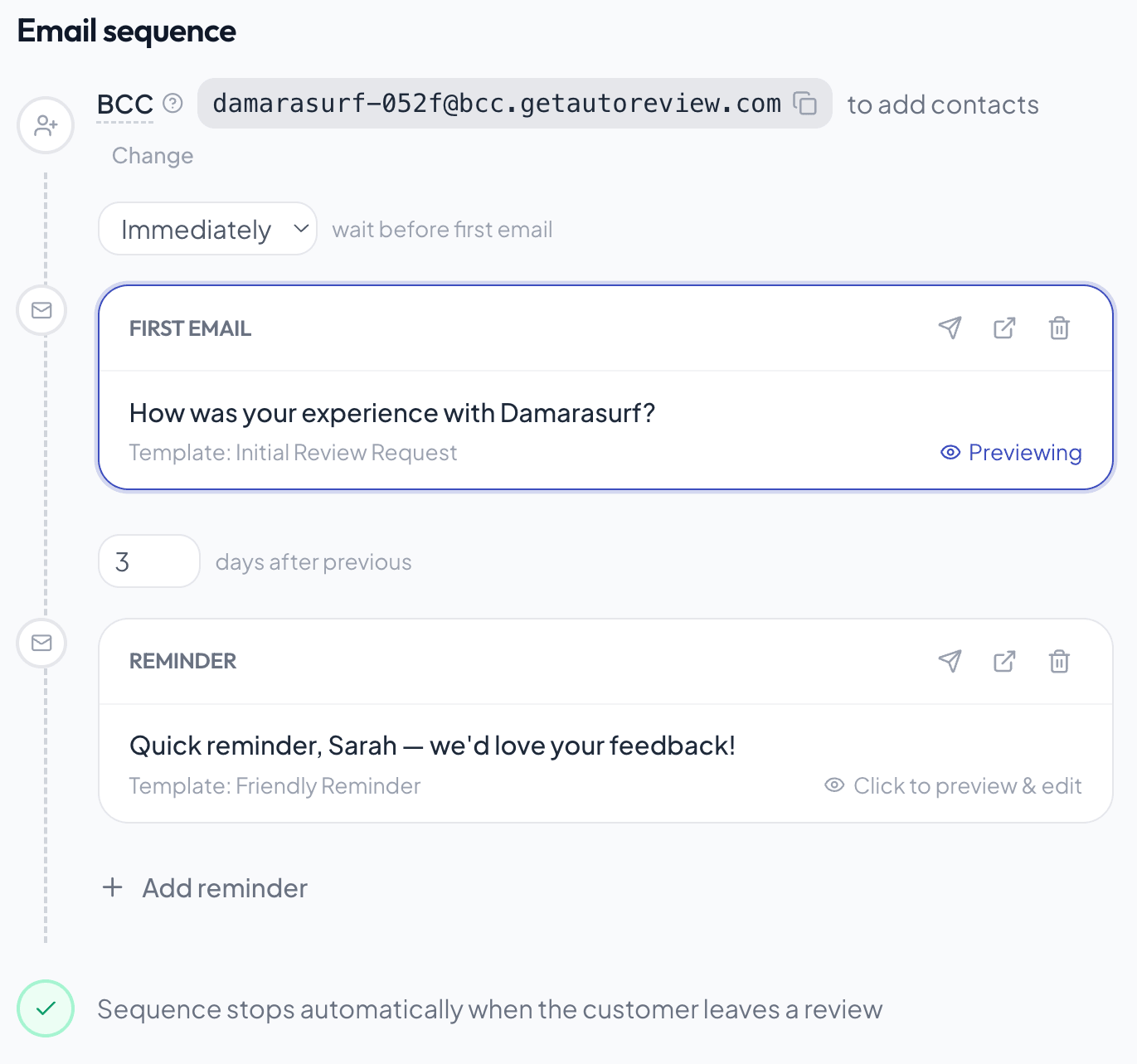
Connect your Google Business Profile, then add patients: connect your booking system via Zapier, BCC one address on the visit confirmations you already send, or upload a CSV. We only need a name and an email or phone number. No treatment details, ever.
Review request scheduled.
It asks every patient, every time
After each visit, AutoReview sends a friendly text or email with a one-tap link to your Google page, picks the right time, and follows up on day 3 and 7. Patients with something to tell you privately get an easy way to reach the office.
Every review gets a reply
When a new Google review lands, AutoReview drafts a warm, on-brand reply that never confirms someone is a patient or mentions their care, and posts it automatically or waits for your OK. Your best reviews go live on your website on their own.
What your customer actually sees
A branded review request by email or text, from your business, sent automatically when a customer lands in your CRM. One tap and they're on your Google page.
Sent from your business name, not ours
One-tap buttons for Google, Yelp, Facebook
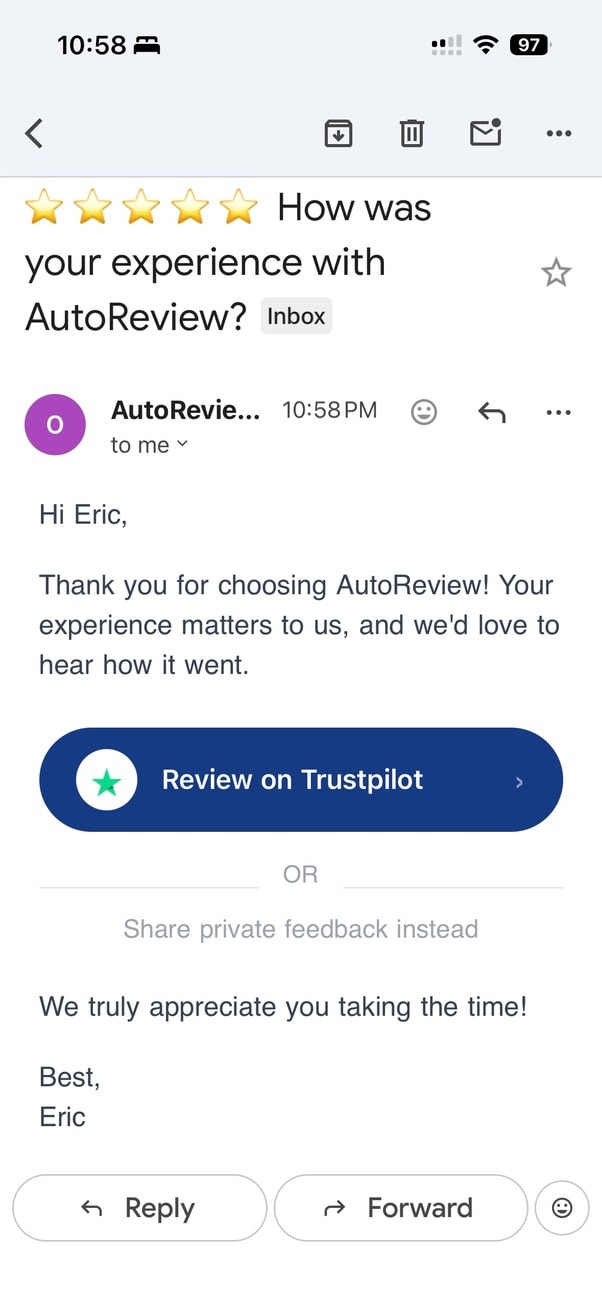
One clear ask — under 30 words
Customer taps the link, lands on the review page, leaves the review.
One login, every review job
Everything it handles for you
It doesn’t just collect reviews. It asks, follows up, helps you reply, and shows you what’s working, so nobody at the front desk has to.
Why Chiropractors live and die by Google reviews
Chiropractic is a referral-and-recurring-care business: a patient rarely comes once. They book an adjustment, get put on a treatment plan, and either become a 30-visit loyal patient or quietly drop off. Before any of that happens, they Google your practice — and the number and freshness of your reviews decides whether they ever walk through the door. AutoReview makes sure every satisfied patient gets asked, after the visit, without your front desk having to remember.
When someone tweaks their lower back or wakes up with a stiff neck, they don't ask their doctor for a chiropractor referral the way they used to — they search "chiropractor near me" and scan the map pack. They're comparing your star rating, your review count, and how recent the reviews are, all in about ten seconds, against two or three other practices on the same block. Cash patients especially are spending hundreds out of pocket and want proof that real people felt better, not just a clean website. A steady drip of recent reviews mentioning things people actually search for — sciatica relief, prenatal care, a gentle adjustment, no high-pressure treatment plan sell — is what turns a cold search into a booked new-patient consult.
In most local markets the chiropractor that ranks at the top of the map isn't necessarily the best clinician — it's usually the one with far more reviews and the most recent ones, because patients trust a practice that's clearly still busy and well-liked today.
Your reviews, live on your chiropractors site
A real AutoReview widget — embed it in about 30 seconds and it updates itself as new reviews come in.
“Came in barely able to turn my neck after months of desk work and put off seeing anyone because I was nervous about chiropractic. Dr. Patel explained everything before adjusting, never pushed a giant treatment package on me, and I felt relief after the second visit. The whole front desk is great about working around my schedule too.”
Danielle R. · Asheville, NC
How to get more chiropractors reviews
- Trigger the request after the visit ends, not at the front desk — patients leave an adjustment loose and relieved, which is the honest moment to ask, and AutoReview can send it automatically once the appointment is marked complete.
- Ask your established treatment-plan patients (the ones on visit 6 or 12), not just brand-new ones — they're the most likely to write a detailed review about real results over time.
- Don't gate by who paid: cash and insurance patients both write great reviews, but a happy cash patient who chose to spend out of pocket often writes the most persuasive one for the next cash patient comparing options.
Chiropractors review FAQs
Is it compliant to ask chiropractic patients for a Google review?
Asking a patient for a public review is standard and allowed — what you must avoid is including any health details. AutoReview's requests simply invite the patient to share their experience and link straight to your Google page; you never write the review or mention diagnoses, and patients control exactly what they say.
Won't the request feel impersonal or clinical to patients?
It comes from your practice name, in your tone, by email or text shortly after the visit. For most patients that timing feels more natural than a front-desk ask while they're checking out — and you can edit the wording so it sounds like your office, not a robot.
Can AutoReview send requests automatically after each appointment?
Yes. If your scheduling or EHR system can hand off completed appointments (via integration or by BCCing your visit/receipt emails), AutoReview enrolls each patient and sends the request and follow-ups automatically. You can also add patients manually in seconds if you'd rather keep it hands-on.
What if I'm not sure it'll actually get my practice more reviews?
You can try it on a 7-day free trial and cancel anytime, and it's $59/mo after that. It's also backed by a guarantee: get your first new review within 30 days or you don't pay.
Simple, honest pricing. No enterprise contracts.
Built for health & wellness practices. Start with reviews, add patient recall when you're ready to bring lapsed patients back.
Reviews
More 5-star reviews for your practice, on autopilot.
Billed monthly · or save with annual
Start your 7-day free trial7-day free trial · cancel anytime · 30-day money-back guarantee
- Asks every patient for a review by text + email after their visit
- Smart send timing + automatic follow-ups
- One-tap link to your Google review page
- Private feedback option, so patients can reach the office directly
- Review dashboard
Reviews + Recall
Also brings lapsed patients back in.
Billed monthly · or save with annual
Start your 7-day free trial7-day free trial · cancel anytime · 30-day money-back guarantee
- Everything in Reviews, plus:
- Automated recall campaigns every 2–4 weeks (your cadence)
- Rebooking reminders (cleanings, adjustments, follow-up treatments)
- Custom message sequences: set once, runs itself
- Revenue tracking: see visits and $ that recall brought back
Want the full feature breakdown? Compare plans →
Frequently Asked Questions
The review work your front desk never has time for. It asks every patient for a Google review after their visit (and follows up if they don't respond), it replies to every new Google review in your practice's voice, and it keeps your best reviews showing on your website. Optionally, it also sends recall and rebooking reminders to patients who haven't been back.
AutoReview only needs a patient's name and an email or phone number to send a request. It never needs treatment, diagnosis, or appointment details. AI-drafted replies are written so they never confirm someone is a patient or mention their care, even if the reviewer brought it up. You can also turn auto-posting off and approve every reply first. Always follow your own practice's compliance policies for patient communications.
That's why AutoReview does it instead of your front desk. A short, friendly message goes out after the visit with a one-tap link. There's no pressure at checkout and no awkward moment, and patients can review whenever it suits them.
Dental practices, med spas, and chiropractic clinics, plus other appointment-based health and wellness practices where new patients pick a provider by reading Google reviews first.
Yes, via Zapier and webhooks: when an appointment is completed, AutoReview can start the review request on its own. No integration? BCC one AutoReview address on the visit confirmations you already send, upload a spreadsheet, or add patients one at a time.
Yes. It apologizes in general terms, stays calm and non-defensive, and invites the reviewer to contact the office directly. It never argues publicly or discusses anyone's care. You choose whether replies post automatically or wait for your approval.
No. Every patient gets the public Google link. The private feedback option is offered to everyone, never used as a filter, and AutoReview never blocks or screens anyone out of leaving a public review. That keeps you within Google's rules. The best protection against an occasional bad review is a steady stream of real 5-star ones.
They're large platforms built for multi-location enterprises, often $300–$600/mo on annual contracts. AutoReview focuses on the reviews work that actually moves new-patient bookings, from $59/mo with no contract.
We save your card so you can start immediately, but you won't be charged until your 7-day trial ends. If it's not for you, cancel before the trial ends and you pay nothing: two clicks in your dashboard, no call required. No contracts, no cancellation fees.
Get your first new review within 30 days or you don't pay. No usage minimums, no request thresholds, no claim windows. We'll set everything up with you on a free onboarding call. See the guarantee page for the full terms.
Your Next New Patient Is Reading Your Reviews
Your patients already love you. Let your Google profile prove it. Set up AutoReview in 15 minutes and your first review request goes out today.