
Built for Google Business Profile
Realtors Recommend the Inspector With the Best Google Reviews. Is That You?
Add clients after each inspection. AutoReview sends a review request with a direct link to your Google page — and follows up automatically. More reviews = more realtor referrals. From $59/mo with a 7-day free trial. Cancel anytime.
- Set up in 5 minutes
- Connects to Google, Yelp & Trustpilot
- 7-day free trial - cancel anytime
Lved by local businesses that live on their reviews
How AutoReview Works
Three steps to autopilot - from first contact to reviews live on your site.
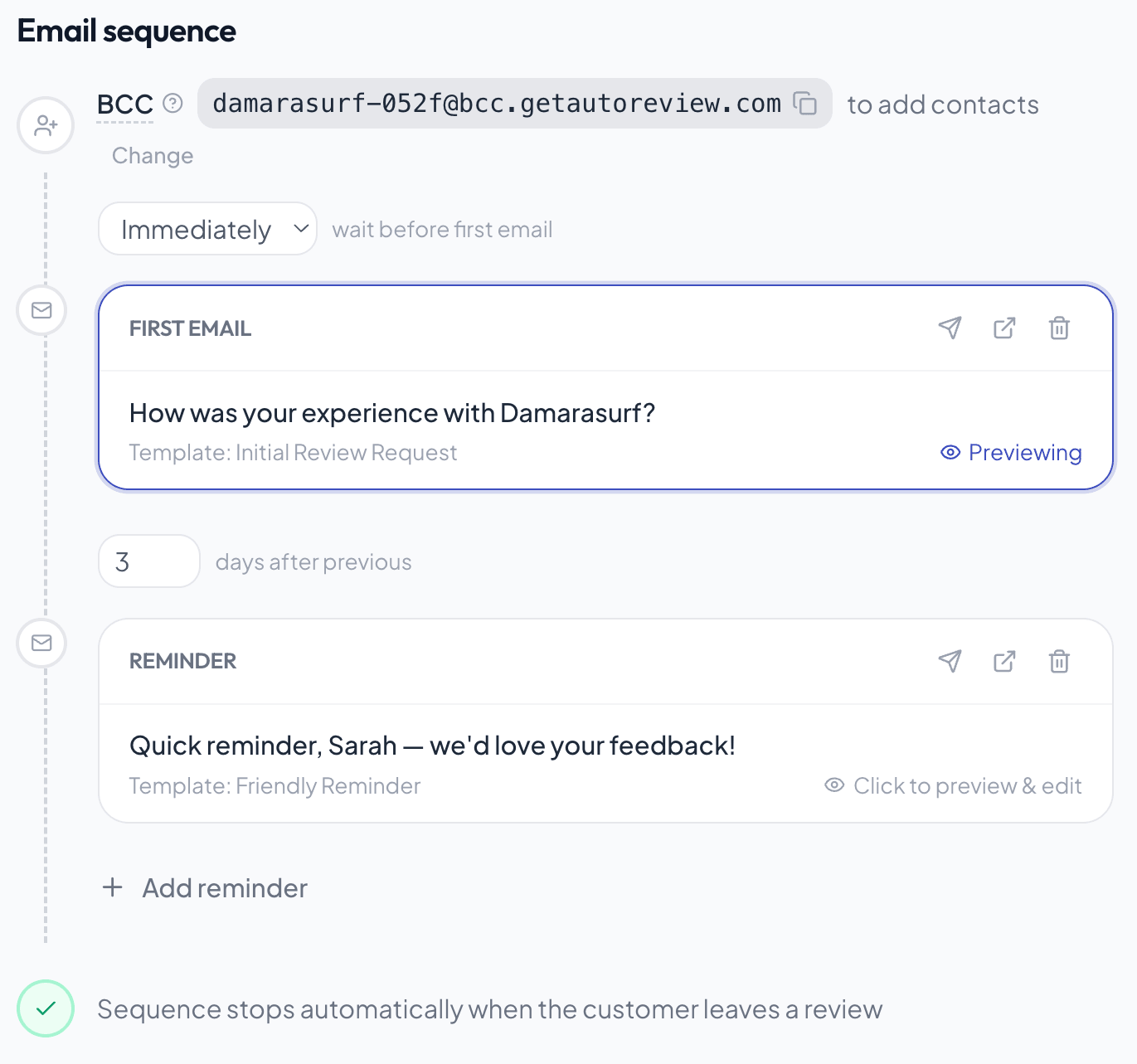
Connect your customers (5 minutes)
Connect QuickBooks, your POS, or Zapier - or just BCC one email address on the invoices you already send. Every new customer flows in on their own. No CRM? Upload a CSV or add them one by one. You set this up once and never touch it again.
Review request scheduled.
Requests go out - you do nothing
Every customer gets an email with one-tap links to leave a review on Google. If they don't act, follow-ups fire automatically at day 3 and 7. You never chase anyone.
New reviews show up on your website
Auto-approve rules pass 4+ star reviews instantly. Your widgets update while you sleep. New visitors see fresh social proof without you lifting a finger.
What your customer actually sees
A branded review request from your business - not a generic third-party email. One tap and they're on your Google page.
Sent from your business name, not ours
One-tap buttons for Google, Yelp, Facebook
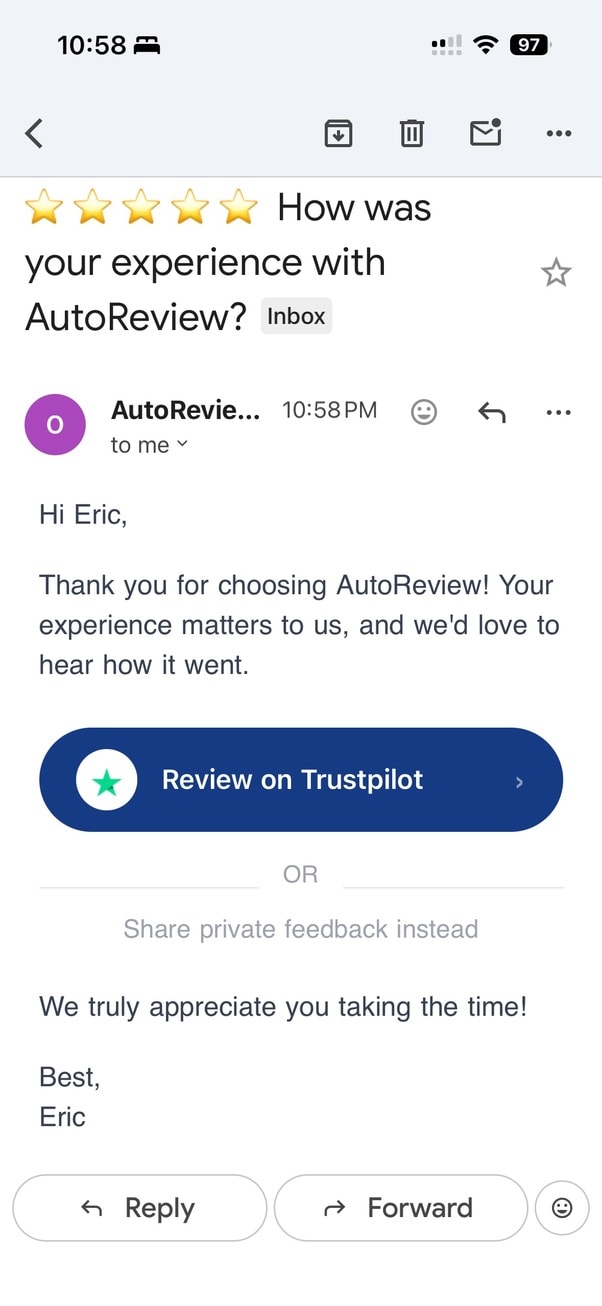
One clear ask — under 30 words
Customer taps a button, lands on the review page, leaves the review.
Here's why you'll love AutoReview:
Send Review Requests and Follow-Ups on Autopilot
AutoReview sends review requests to every customer automatically - with direct links to Google, Yelp, Facebook, or any platform you choose. If they don't respond, the system follows up on its own until they act or the campaign ends.
- BCC one email address on invoices you already send - customers get added and the review sequence starts automatically
- Or upload your customer list, connect via Zapier, or add contacts one at a time - the campaign starts sending immediately
- Your review platform links sit inside the email as buttons - one tap and the customer lands on the review page
- Follow-ups go out on the schedule you set - no manual chasing, no remembering who you already asked
- Every email goes out under your brand name, not ours - your customer thinks you sent it personally
Paste One Script Tag. Your Reviews Go Live.
Paste one script tag onto your website once and your review widgets are live. Every new review you approve shows up automatically - no logging in, no copy-pasting, no developer required.
- Choose from a Wall of Love, carousel, star rating badge, trust badge, or avatar widget - pick what fits your page
- Paste one line of code anywhere on your site - works on WordPress, Squarespace, Wix, Shopify, or any custom site
- Every approved review feeds into your widgets automatically - your site always shows your latest social proof
- Mobile-optimized and CDN-delivered - widgets load fast and look good on every device
Show Up in Google Search Results
AutoReview automatically adds schema markup to your website - the code that tells Google to display your star rating and review count right next to your link in search results. No developer needed, it's built into the embed.
- Your star rating and review count can appear directly under your website link in Google search
- More stars in search results means more clicks before a competitor even gets a look
- Works on any website - WordPress, Squarespace, Wix, Shopify, or custom sites
- The more reviews you collect, the stronger your search presence gets over time
yourbusiness.com
Your Business Name - Trusted by 100+ Customers
competitor.com
Another Business — Services
One login, the whole toolkit
Everything AutoReview does for you
It’s not one tool — it’s everything you need to collect, show off, respond to, and understand your reviews. All in one place.
Why Home Inspectors live and die by Google reviews
For home inspectors, the customer who hired you usually buys one house and disappears — the relationship that actually feeds you is the realtor who keeps sending buyers your way. And before an agent adds you to their "approved inspector" shortlist, they pull up your Google profile to make sure recommending you won't blow up in their face. A thin, stale review count quietly costs you the referral pipeline that every home inspection business runs on.
Most home inspections come through a realtor's recommendation, and an agent's own reputation is on the line every time they hand a client your name. So they don't gamble — they refer the inspector whose Google profile is loaded with recent five-star reviews, ideally ones that mention thoroughness, a clear report, and not scaring buyers off a fixable house. Nervous first-time buyers do the same: after the agent names two or three inspectors, the buyer Googles each one and books the one strangers already trust. Reviews aren't a vanity metric in this trade — they're the thing that gets you onto agents' shortlists and keeps you there, which is exactly where home-inspector revenue comes from.
In home inspection, recency and volume tend to matter more than for most trades — agents and buyers both treat a wall of fresh reviews as proof you're actively working and current on the area, while a profile that hasn't moved in a year reads as a red flag.
Your reviews, live on your home inspectors site
A real AutoReview widget — embed it in about 30 seconds and it updates itself as new reviews come in.
“Our agent recommended three inspectors and we're so glad we went with this one. He spent over three hours on the house, walked us through every issue in plain English instead of just scaring us, and had a detailed report with photos in our inbox the next morning. As first-time buyers we finally felt like we knew what we were actually buying.”
Danielle R. · Round Rock, TX
How to get more home inspectors reviews
- Send the request the moment the report is delivered, not at the end of the walkthrough — the buyer's gratitude peaks when they open a clear, photo-filled report, so AutoReview can fire the ask right after you email it.
- Collect reviews from both sides of the deal: the buyer AND the referring agent. A review that names the realtor ('great working with [Agent] on our inspection') is gold for landing more referrals from that office.
- Don't ask on a deal that fell through — if the buyer walked away over your findings, skip the review request and protect your rating; only enroll completed inspections where the report landed well.
Home Inspectors review FAQs
Should I ask the buyer or the referring realtor for the review?
Both, and AutoReview lets you do it without double-typing anyone in. The buyer's review reassures future nervous buyers; the agent's review (and a buyer review that names the agent) is what keeps you on that office's referral list. We can send a tailored request to each contact you add after an inspection closes.
My clients never become repeat customers — does collecting reviews even pay off?
That's exactly why it pays off. A buyer hires you once, but your Google profile works on every future buyer and every agent deciding whether to refer you. One review from a one-time client keeps earning referrals for years, which is why a steady flow matters more in home inspection than in trades with repeat customers.
What if a deal falls through because of what I found in the report?
You stay in control of who gets asked. AutoReview only sends to the inspections you enroll, so you simply don't add a contact when a deal went sideways or the buyer wasn't happy. We never promise to manufacture star ratings — we just make it effortless to ask the clients who left thrilled, which is where your fresh five-stars come from.
How fast will I actually see new reviews?
Inspectors typically run one to three jobs a day, so once requests start going out after each delivered report, reviews come in quickly. AutoReview is $59/mo with a 7-day free trial, cancel anytime, and a money-back guarantee: if you don't get your first new review within 30 days, you don't pay.
Try it free for 7 days. See the reviews roll in.
Start your free 7-day trial today. No charge during your trial. Most businesses pay $900–$1,500 a year for review collection. AutoReview starts at $59/mo after your trial. Cancel anytime. No developers needed.

Simple, honest pricing. No enterprise contracts.
Built for home-service businesses. Start with reviews, add reactivation when you're ready to win back old customers.
Reviews
Get more 5-star reviews on autopilot.
Billed monthly · or save with annual
Start your 7-day free trial7-day free trial · cancel anytime · 30-day money-back guarantee
- Automated review requests by text + email after every job
- Smart send timing
- One-tap link to your Google review page
- Negative-feedback catch (unhappy customers routed to you privately)
- Review dashboard
Reviews + Reactivation
Turn your old customer list into new jobs.
Billed monthly · or save with annual
Start your 7-day free trial7-day free trial · cancel anytime · 30-day money-back guarantee
- Everything in Reviews, plus:
- Automated win-back campaigns every 2–4 weeks (your cadence)
- Seasonal & service reminders (tune-ups, filter changes, inspections)
- Custom message sequences — set once, runs itself
- Revenue tracking — see jobs and $ reactivation brought back
Want the full feature breakdown? Compare plans →
How AutoReview Stacks Up
| Feature | AutoReview | NiceJob | Birdeye |
|---|---|---|---|
| Price | From $59/mo | $75–$125/mo (annual contract) | $299+/mo (annual contract) |
| Video testimonial collection | |||
| BCC auto-collect (no workflow change) | |||
| Platform links embedded directly in email | |||
| Schema markup / rich snippets | |||
| One-line embed code (no developer needed) | |||
| Bad review recovery flow | Limited | Limited | |
| Unlimited forms & Walls of Love | |||
| Auto-share best reviews to social | |||
| Setup time | 15 minutes | 30–60 minutes | Onboarding call required |
| No contracts or commitments | Annual contract | Annual contract | |
| Total cost over 3 years | From $2124 | $2,700–$4,500 | $10,764+ |
Prices based on publicly available information. Actual pricing may vary.
Frequently Asked Questions
No. That's the whole point. You set it up once (15 minutes, or we do it with you on a call), and it runs in the background. Finish a job, and your customer gets a review request automatically. You don't need to be at a desk, open an app, or remember anything.
Podium charges $400–$600/mo with a 12-month contract. Birdeye is $300+/mo. They're built for multi-location enterprises with features you'll never use. AutoReview does the one thing that actually matters — getting reviews coming in consistently — from $59/mo with no contract.
We save your card so you can start immediately, but you won't be charged until your 7-day trial ends. Send campaigns, collect reviews, embed widgets on your site. If it's not for you, cancel before the trial ends and you pay nothing. No call required — two clicks in your dashboard.
Yes. No contracts, no cancellation fees, no 12-month lock-in. Cancel from your dashboard in two clicks. Your account stays active until the end of your billing period.
Yes, via Zapier and webhooks. When a job is marked complete in your scheduling software, AutoReview can automatically send the review request. No manual step required.
Yes. You don't need fancy software. The easiest setup is to BCC one AutoReview email address on the invoices or confirmations you already send — that one address quietly adds the customer and starts the review request. No CRM, no QuickBooks, no problem. You can also upload a spreadsheet or add customers one at a time from your phone.
You can — and you probably mean to. But on a roof or under a sink, you forget, and the busiest weeks are exactly when you forget most. That's the whole point of AutoReview: it asks every single customer, every time, the same day — so it never depends on you remembering at the end of a long day.
Every review request gives the customer a private feedback option right alongside the public review link — so anyone who'd rather tell you something directly has an easy way to reach you. It's offered to every customer, not a filter: AutoReview never hides, blocks, or screens anyone out of leaving a public Google review. The best protection against the occasional bad review is a steady stream of real 5-star ones, which is exactly what the system builds.
We'll notify you as you get close. Most businesses with under 500 customers/month never hit it. If you do, add a Volume Growth pack (5,000 more) or Volume Scale pack (25,000 more) from your dashboard. No interruption to your campaigns.
No. Most users are live in 15 minutes. Connecting Google Business Profile is two clicks. Adding widgets to your website is one copy-paste. And if you get stuck, we'll do it with you on a call — included free.
Get your first new review within 30 days or you don't pay — no usage minimums, no request thresholds, no claim windows. You book a free onboarding call where we set up your campaign with you, live, so you're set up to win before the clock matters. See the guarantee page for the full terms.
Every Week Without Reviews Is a Week Your Competitor Pulls Ahead
You're already doing great work. Let your Google profile prove it. Set up AutoReview in 15 minutes — your first review request goes out today.